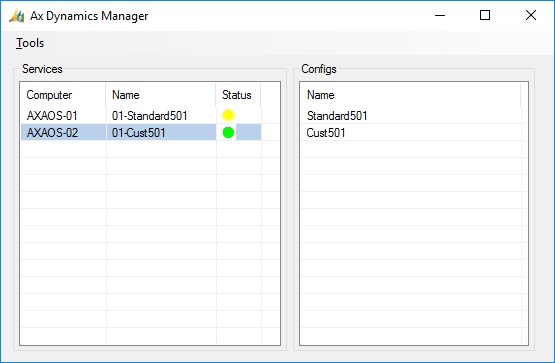
This is version 1.03 see change list at the end of the post.
The program is tested for AX 2009 and AX 2012.

Config menu.


Controlling services.
If you select more that one Service, all those services will be affected. If you choose to restart, all services will first stop, and only start again when all services has stopped.
You can also control a service by double clicking on it, double clicking on a started service will stop it, and on a stopped service it will start it.

Changing AX Config list.

Starting AX.
Planned changes.
General:
Service list:
Add a counter of online users on the AOS.
Setup witch strings to search for to show the service list.
Config list:
Add check of AOS running before starting AX. (How?)
Changlog.
1.03 : Added splitter to form, should make it easyer to resize the form to show the right stuff.
Added menu item “Reset Window”, this sets default values for window size.
Save some settings to file AxDynManager.settings in program folder.
Rewrite code for handeling the service list to give it better structure.
Enabled multi select in Service list, this means that you can now start/stop and restart
more than one service in one go.
When selecting restart on more than one service, alle services are stopped first,
and then started only when all services are stopped.
Fixed error with double backslash read from Registry.
Fixes error with vertical bar in config file.
1.02 : Fixed error with parmBinDir not beeing read from AXConfig file.
Added parmBinDir to EditAXConfig form.
Fixed error when there are no AX Configs anywhere.
Fixed error with BinDir not being read from AXConfig file.
Fixed EditAxConfig form, field TabIndex, and the position of the OpenFile buttons.
Added Class UtilLogging.
Added logging in AXStartup.cs
Added check if the paths in ParmBinDir and ParmLog exists before starting AX.
Added check for double backslash in filePaths when importing configfile.
Added handeling of multible AOS servers for parmAOS2.
Added handeling of space in parmStartupMsg (Replace with Acsii 255)
1.01 : Save and Load AX Configuration list to file. (Done on start of program, and changes of list)
Added for to Edit AX Configurations.
Import of AX Configuration from .axc files.
Made it possible to delete an AX Configuration from the list.
Function to check last program version and do config cleanup.
THANKS TO : Florian (Testing)
Thank you for the fast response, that should make the next release a bit more comfortable. Good work!
Small issue with the gui: the window now remembers it size, but the two lists in the form do not, so everytime the program is started, the window size has to be increased to increase the size of the lists. I guess sometime next week I will reach the maximum window size that my Screen can support 🙂
In the changelog you mentioned a "Reset Window" menu item, but I could not find it.
I fixed the error and uploaded the .zip file again.
So download it again and try again.
Sorry about the bug.
Works great now, thank you!
Denne kommentar er fjernet af forfatteren.
Great program. I have checked version 1.03 and have some suggestions:
– I have added 5 AOS servers to the program. Only about 16 services are visible in the window. I am not able to resize the window to show more,
– In the grid I would like to see the service column "Startup type" (Disable/Manual/Automatic/Delayed Start)
Are you sure you can't resize the main window of the program to show more than 16 services?
I have 17 services showing and room for more?
About the startup type column, i will add it to the todo list.
I found the "Reset window" button. It solved my resize problem.
Another thing I noticed is that with 3 AOS added (an 43 AX services) it takes 40 Seconds from I click the AxDynManager until the window actually opens. If I remove all computers, the Windows opens immediately.
Yes i have seen that loading time can be kind of long.
I will also have a look at that for the next version.
I just discovered the "Edit config" Feature, this is great (especially the "Start in Developer mode" checkbox). You should add a screenshot of that to the blog entry to highlight this more. Again, thanks for the tool, today's release was a bit more fun than before 🙂
The tool seems to interfere if you change the AOS configuration. The restart of the AOS Fails and a manual restart seems to ignore the configuration changes. Only after closing the tool and redoing the configuration change the change was active. I admit, it is an edge case and I only encountered the issue once so far, but it can be confusing if you don't know what causes the issue.
Hi Florian, I do not know how I did not see your comment before now.
But I do not understand what you are saying, what is the problem.
By the way, I am working on next version, mostly did some rewriting of the code, so its easier for me to make changes.
But also some new stuff.